This repository contains a Clean Architecture-based user management project organized as a Maven multi-module service.
I've designed user-management-service with microservice architecture in mind.
In other words, it's a small service that has one duty: manage users/ roles/ authenticate them
- Project Structure
- Clean Architecture Overview
- Module Documentation
- Parent Module (
user-management-service) - Build and Run
- API Request Collection
- Suggested Development Flow
Clean Architecture Springboot/
├── readme.md
├── requests/
│   └── user-management-api/
│       ├── add-user.yaml
│       ├── archive-user-by-cin.yaml
│       ├── get-users.yaml
│       └── update-user-by-cin.yaml
└── user-management-service/
    ├── pom.xml
    ├── notes.md
    ├── todo.txt
    ├── domain/
    ├── application/
    ├── infrastructure/
    └── presentation/
Note that user-management-api has yaml configuration for api requests.
These are only used by ApiArk which is a FOSS alternative to Postman.
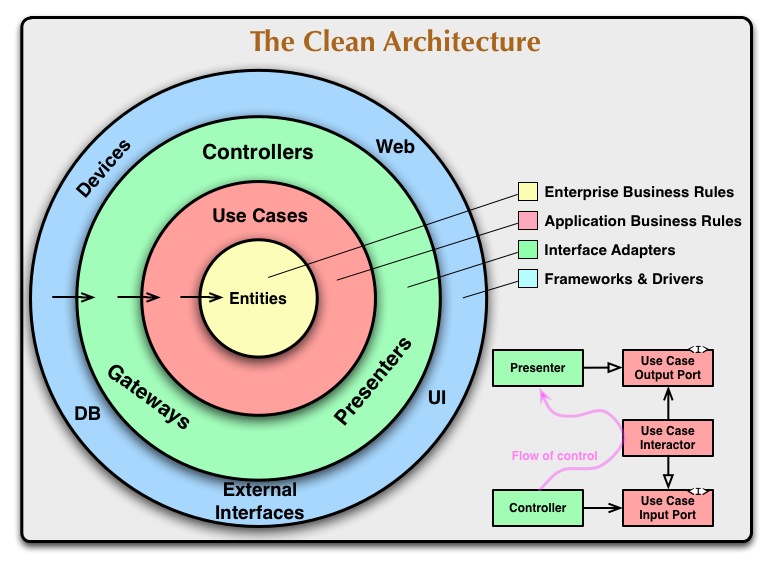
This service follows a layered architecture where dependencies point inward:
domain: It holds the entities.UserandRoleapplication(use cases): Defines operations and the business logic. In short, these are the use cases within the use case diagraminfrastructure(interface adapters): It implements adapters used within iur business logic.presentation(framework): It's the framework layer. Can be swapped with any presentation layer (Spring, Quarkus, CLI, etc)
Path: user-management-service/domain
Purpose:
- Contains enterprise/business entities and core domain concepts.
- Represents pure business logic and rules that should not depend on frameworks.
From your compiled classes, this module includes domain concepts like:
UserRoleUserState
Typical responsibilities:
- Domain entities/value objects
- Domain-level invariants
- Business-centric enums/models
Path: user-management-service/application
Purpose:
- Implements use cases and application orchestration.
- Defines contracts (ports) that's used by use cases. Input ports (boundaries) are implemented within
application, whereas output ports likeUserPersistenceAdapterare implemented withininfrastructure
Observed package intent (from compiled output):
ports/for interfaces (input/output boundaries)user/,role/for use-case organizationauth/for authentication-related application workflows (Work In Progress)exception/,modal/for application-level exceptions/models
Typical responsibilities:
- Use case services
- Input/output port definitions
- Transactional orchestration of domain behavior
- Application DTOs and errors
Path: user-management-service/infrastructure
Purpose:
- Provides technical implementations for the contracts defined in
application. - Integrates external systems (database, persistence, framework adapters).
Observed resources:
application.propertiesimport.sql: After starting ORM and creating tables, it runs theINSERTqueries within the file
Typical responsibilities:
- Repository implementations
- JPA/Hibernate entities and mappings
- Database configuration and data seeding
- External integrations (security providers, messaging, etc.)
Path: user-management-service/presentation
Purpose:
- Exposes the system to clients (HTTP API/controllers).
- Handles request/response mapping and delegates to application use cases.
Typical responsibilities:
- REST controllers
- Request validation
- Response DTO mapping
- Exception-to-HTTP translation
Path: user-management-service/pom.xml
This is the aggregator/build entry for all service modules:
domainapplicationinfrastructurepresentation
Use this level for full project builds and tests.
The exact runnable Spring Boot main class is not shown in the provided context. The commands below are standard Maven multi-module commands and may need adaptation depending on where your boot entry is configured.
cd /home/yassine/Documents/Projects/Clean-Architecture-test/user-management-service
mvn clean installCurrently, it has no tests, but here's the command in case you needed it
cd /home/yassine/Documents/Projects/Clean-Architecture-test/user-management-service
mvn testIf presentation is your boot entry module:
cd /home/yassine/Documents/Projects/Clean-Architecture-test/user-management-service
mvn -pl presentation spring-boot:run
If the boot plugin is configured at parent level:
cd /home/yassine/Documents/Projects/Clean-Architecture-test/user-management-service
mvn spring-boot:runPath: requests/user-management-api
This folder contains request definitions for key user-management operations:
add-user.yamlget-users.yamlupdate-user-by-cin.yamlarchive-user-by-cin.yaml
Use these files as ready-to-run request templates in your API client workflow (or as endpoint behavior references during development/testing).
- Model business rules in
domain. - Implement or adjust use cases and ports in
application. - Implement adapters in
infrastructure. - Expose or adjust endpoints in
presentation. - Verify behavior with tests and the request files under
requests/user-management-api.